In v3, how can you mark 1 season as watched again?
Detailed description with additional context about the workflow
I don’t know if I’m dumb or if the functionality is just not there in v3 (in which case we can only hope it gets added to the backlog of features to add), but both on the website and on the android app, I can’t figure out how to mark 1 season of a show that I have already watched, as watched again.
On the old v2 this was easy to do, you just scrolled down to the seasons overview, or opened the season page, clicked the check box, and selected ‘watch season again’ or something like that. On v3 however, I only seem to find to either remove the full season, watch each episode again one by one, or select ‘watch until here’ which also doesn’t add the episodes again as watched (but I feel like this is the correct behaviour).
Going back to v2 isn’t an option because I don’t have VIP.
I found in the settings that there’s an option to ‘Enable multiple watches’ which was already enabled. I feel like there should just be a button on season level, right next to the ‘remove from watched’ button but there isn’t.
I did this on web. I went to the show then clicked on seasons. This opens on the right. If I click the three dots there and option to track and it brings up the menu. Does that work?
Okay I gave this a try, and yes this works, but only if you haven’t seen that season yet. So when I haven’t seen the season yet (fully), I get the following view:
But when I have seen the season already, all I get is the view I showed in my previous message, which is the option to remove the season from history So there’s no option to mark the season as watched again.
I found this. Scroll all the way to the bottom (watch again) and see if that works. I know my account got locked out for duplicates in my history (they set a limit) so not sure if they removed that and only keep the earliest.
@m_dg_be if you haven’t already, check this article that Roi posted. You can also scroll to the last episode of the season you are trying to mark and click the 3 dots to see this menu and click “Watched until here”
@otakunet21 The watched until here only works for episodes you haven’t watched at all it seems. Tried it but it’s marking 0 episodes as watched again. When using it together with an episode I haven’t watched, it does mark that episode as watched. So it’s mainly if you watched a bunch of episodes since you last updated your trakt and want to quickly catch up to the correct episode.
@RoiDesRois It’s definitely possible to mark individual episodes as watched again, but that’s not practical for anything that’s more than a few episodes. I haven’t tried just clicking the checkbox on the main show page and selecting a new watch of the full show because I haven’t fully finished the one I’m watching now, but that is also only useful in some situations where you actually have watched the full show again AND where you didn’t start tracking the watched seasons while you were going through them.
I’ve been rewatching Bob’s Burgers for the last year or so, and some seasons I have marked as watched a second time (when I still had access to v2), but now in v3 I can’t mark other seasons as watched again unless going through each episode individually and marking them as watched again lol but that’s over 100 episodes, not gonna waste my time on that. So my hope is that the developers will make it work again for seasons like in v2.


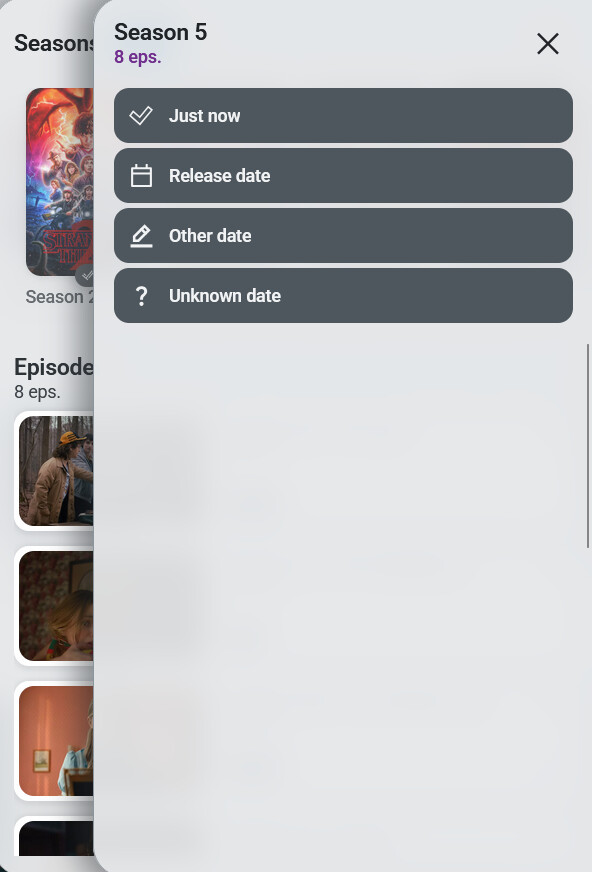
 So there’s no option to mark the season as watched again.

