How do I mark a movie as watched?
You can mark a movie as watched by clicking on the “checkmark” icon. That can be done in various sections.
On the movie page:

In the discover and search sections, you just need to click on the 3 dots and the option will show up:


What happens when I click that checkmark?
On any sections that are not your home screen, the system will ask you when you watched that movie and you will see these options:

Now Watching: Means you just started watching this item, and it will be marked as “watched” after its runtime. If you choose this option, you will see this when using the website or app:

With that, you can track the progress of the item, and it will disappear once it finishes.
You can cancel that at anytime by clicking on the “X”.
Just now: Use this option if you have just finished watching that item. That will mark the item as watched immediately.
Release date: Use this option if you watched this item live or close to when it released.
Other date: Use this option when you know the date and time you watched the item.
Unknown date: Use this option if you have no idea when you watched the item. This is often used to mark items you have watched before you created an account at Trakt.
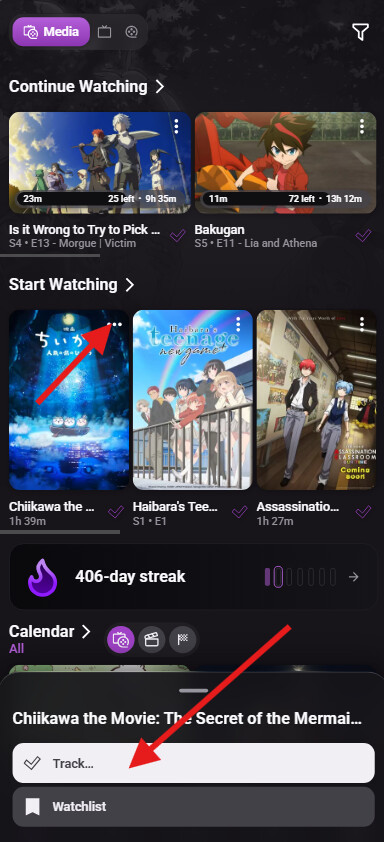
What about the home screen? What happens when I click the checkmark there?
On your home screen, when you click the checkmark, the item will always be marked as watched using the “Just Now” option. If you need to choose a specific date, you will get that option by clicking on the 3 dots:
How do I mark shows as watched?
How you mark a show as watched will depend on how much you have watched of that show.
If you have already watched all episodes of that show, you just need to track it the same way you would track a movie. Clicking on the “checkmark” icon:

After you choose the option on when you watched, the system will ask if you are sure you want to mark all episodes of that show as watched:

If you know exactly the episode you stopped watching that show, you can scroll to the seasons, then scroll through the episodes and find the last one you have watched, you can then mark it and all previous episodes by clicking on the 3 dots:

If you have just started watching that show and want to mark episode 1, you just need to scroll to episode 1 and tap the checkmark icon:

How do I keep track of the shows I haven’t watched all episodes?
After you mark the episodes you have watched, if there are any episodes released after the last one you marked, you will find that show in your “Continue Watching” section:

You can also check your calendar to see if any of the shows you have marked as watched or that are in your watchlist will release new episodes:


What do I do if I don’t want to watch that show anymore?
In that case, you can click on the 3 dots and choose the option to “Drop show”:

That option will keep your progress saved, but will remove the show from that section. If you ever want to continue watching it, you just need to either watch a new episode of the show or add it to your watchlist.
Where can I see all the items I have marked as watched?
You can see the items you have marked as watched in your history. That will show you a timeline of everything you have watched based on the dates you chose when you marked them as watched.


The history can be found on your profile screen and at your home screen.
Shows also have a specific progress section, where you can see all items that are in progress, all items that are completed and everything you have dropped. That section can be found in your profile:

You can also expand that section by clicking on the arrow. Use the icons at the top to change the states:

How do I check when I watched a specific movie, show or episode?
You can check your history for a specific item by clicking on the 3 dots menu of the page you want to check:


You can also see your history by clicking on the “watched” tag on the poster:

How do I remove something I accidentally marked as watched?
To remove your plays, just click on the same icon you used to mark it as watched:

The system will ask if you are sure you want to remove that item:

You can also remove specific plays using your history:


How can I tell if an item is already marked as watched?
Movies and shows you have completed will have a purple button and a white double checkmark icon. They will also have a “watched” tag under the poster.
For comparison, the first image has a show that hasn’t been watched yet and the second image has a show that has been fully watched.


You can also see the difference between watched and unwatched episodes. The watched episode will have a double white checkmark under the poster, and the unwatched episode will have a single purple checkmark.

How can I add a rewatch?
That option can be found in the 3 dots menu of an episode, a show and a movie page:
