To create an account at Trakt, you have 3 options. You can connect your Google account, your Apple account or create an account using your email.
To do that, first, you need to access our website and click on “Join Trakt for Free”:

Then, you will see the Sing in to Trakt screen.

That’s also the same screen you will login in the future.
Then it’s done, your account has been created!
Can I import my data from other services?
Yes, you can. Once your account is created, you should see this at your home screen:

You can also check our Welcome page:

How do I edit my personal information after the account creation?
You can manage any options in your settings. To access it, you just need to tap on your profile picture and then on the “gear” icon:

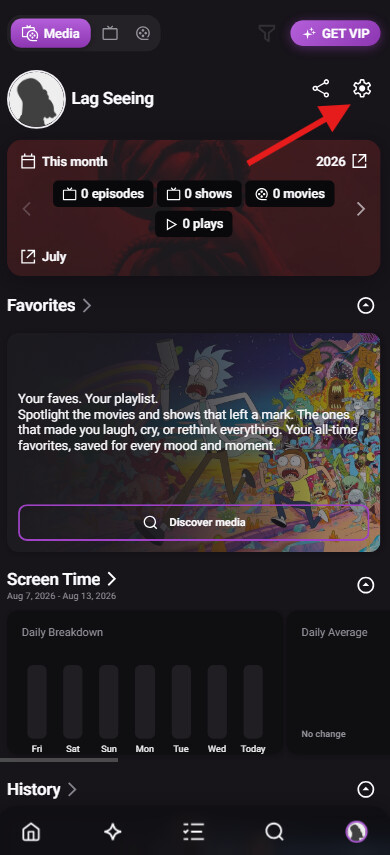
You can change your Username, Email, Birthday and Location in the “Account” settings.
You can also choose if your account is public or private, if you want to see spoilers or not, and if you want to track episodes and movies multiple times or only once in the “General” settings.
To change your profile picture, just tap your avatar:

Do you have any tutorials on how to track what I watched?
Yes, if you have any questions about how to build your history, you can read this article:
How do I mark a Show or a Movie as Watched? - Support / Tutorials - Trakt Forums
If you have any questions about how to add items you plan to watch to your list, please read this article:
What is the Watchlist? What kind of items should I add to it? - Support / Tutorials - Trakt Forums
We also have some cool VIP features that can help you to keep track of your data with the Automatic Streaming Sync and the Plex Sync.
If you have an HBO Max account, you can test the automatic streaming sync with a free account.