My lite is worse nothing at all
Edit by @Ohifriend:
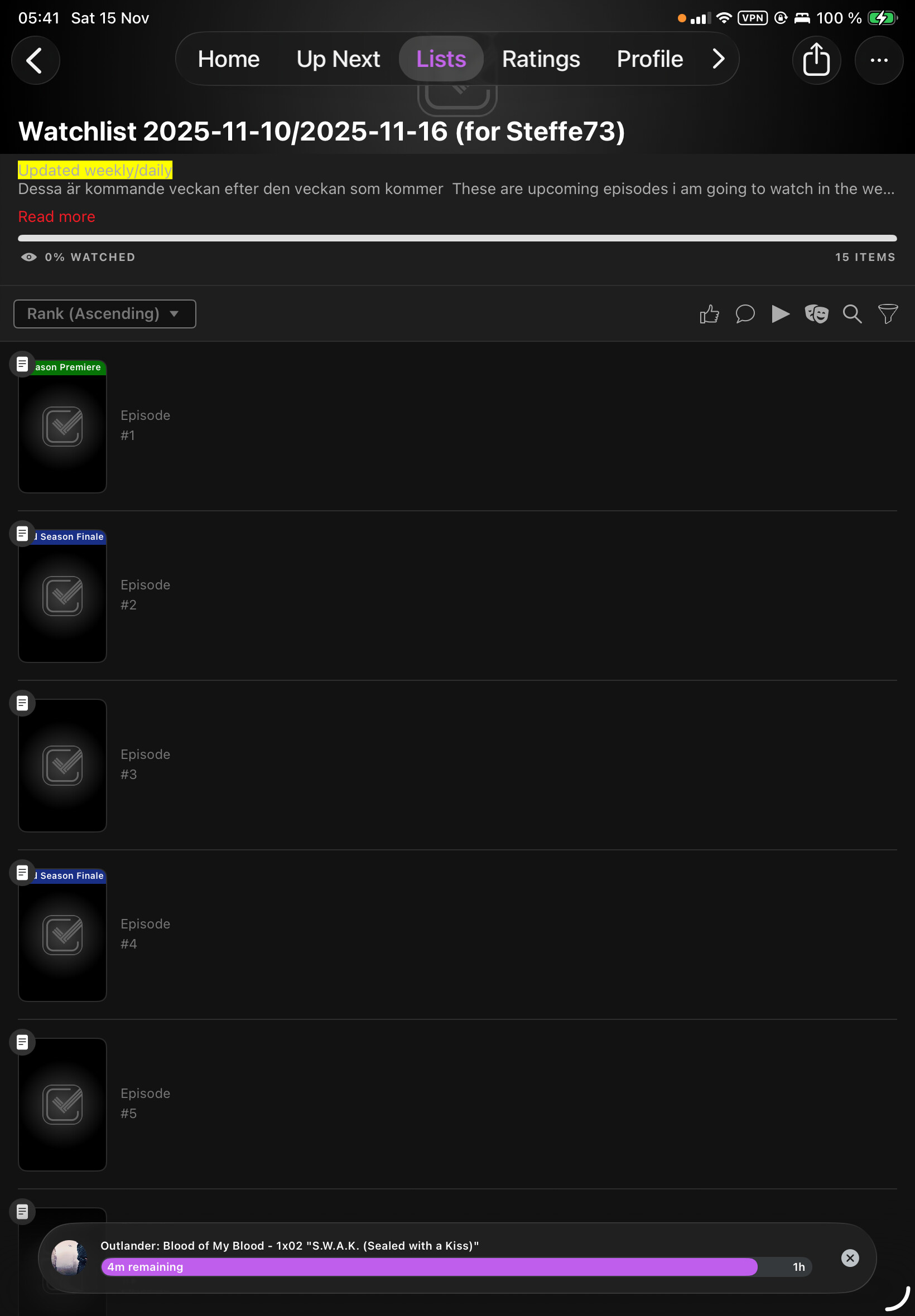
Lists that contain episodes and seasons are not loading correctly
My lite is worse nothing at all
Edit by @Ohifriend:
Lists that contain episodes and seasons are not loading correctly
Hello! I’m chiming in on this thread because I’m also experiencing issues with lists.
For context, I have a list that I tinker with, which contains a mixture of movies, TV shows, seasons of shows, and individual episodes that I prefer to watch in release order.
In the classic web experience, I can see the episodes, seasons, TV shows, and movies in the list and navigate to those pages.
However, in the Apple app (both the live app and the TestFlight versions for iOS and Apple TV),:
the episodes are “populated” but not visible in terms of showing the episode information, which presumably prevents navigation to the episodes.
The season posters for the shows are visible but do not link to the season’s page.
Conversely, movies and the full TV shows appear as intended; they are populated and allow navigation to the specific show or movie.
Perhaps this detail will help in replicating and addressing this bug, as it’s one of the biggest reasons I renewed my subscription very recently.
Additionally, I’ve noticed in the TestFlight iOS app that a majority of the sorting and filtering functionality on the page has been greatly reduced. I would like to raise this concern, as this could continue to disrupt my user experience and represents another benefit that has been cut back for VIP subscribers and would caution pushing that version of lists with minimal sorting and filtering.
Please stay on topic, don’t address other matters ””Additioanother benefit that has been cut back for VIP subscribers and would caution pushing that version of lists with minimal sorting and filtering.””
But thx for the screenshots, maybe developers fix this asap.
Thx
If you’re trying to tag someone you need to use the @ sign not the # sign and you don’t need to tag more than once. I’ll tag @Ohifriend for you
Ok sorry my bad i through it was #
Thx
So that’s why no answer from him about this case. 
Believe I know why bugg / errors occur
It’s the new build forcering filter
But it doesn’t help the previous build
But I see my items.
But no notes which I think is very very very important
@ohlfriend
It looks like the show reference is missing from the season and episode items, causing this. I will get someone to take a look, thanks.
I have the same problem on the “classic” android app. I have one episode in a list and it’s the only one not showing. Black cover and no title. Works fine on the classic web.
This should be fixed now. Please try force quit your app, and worst case clear cache (Android) or reinstall if things aren’t working - just depends on how caching is handled since the bug.
Yep it works now, on my side at least.
So fast, thank you, great work @Ohifriend
Still not fixed in the new android app, which is also missing season pages
My guess is your issue is related to Episodes missing from lists?
I’m considering this topic closed otherwise