Thanks for checking. I wonder if it’s actually a Plex hosted service that is producing that error then. That at least gives me another angle to investigate.
Not sure whether you’ve ever looked at this but it might give you some ideas too to implement in your code for Plex Sync as it does seem to support bi-directional watch list syncing:
I just pushed some fixes for the 401 error, so hopefully this gets the auto sync moving forward. I’ll monitor today and see.
1 Like
I’ll take a look, thanks! This python package is also a good reference.
Seems like an auto sync happened for me. Almost all other sync where forced manual syncs
Is there anything that we can do about duplicate plays from using Plex Sync? If I do a complete sync of my Plex library I get about 8000 plays added to my watch history and almost all of them are duplicates. I rolled back this sync.
I did a new sync and added 119 plays and all of those are duplicates.
1 Like
I have a problem with the Plex Sync. It doesn’t work anymore. last sync is from 10 sept 2025 10:15 PM. I have undone all the syncs, disconnected and reconnected plex. But it doesn’t matter what I do, I don’t see anything getting synced anymore. When it was syncing, I got already marked watched episodes and movies marked as watched 2 times.
Also got this line: “No Plex libraries found! Please add at least 1 library to your Plex media server and also verify you have remote access enabled.” Where I have 2 of my libraries selected…
FYI, I am out of the office next week so I won’t be working on plex sync or responding during that time.
I’m working in phases. The first phase is syncing from Plex to Trakt. The next phase will include things like removing from library and syncing data back to Plex. I do have to be careful with deleting library items though. If I get no or bad data from Plex, I would want to just blank out your Trakt library for example. This would for sure be an opt in setting.
I think the check for this needs to be more broad on the Trakt side. Currently it looks for an exact timestamp match to determine a duplicate.
I will have to think about this more. Right now it just stores a single timestamp, set at the end of any successful sync. I might need to store individual timestamps (history, library, ratings, watchlist) and perhaps use the start as that saved timestamp. That might allow it to pick up items scanning during the Plex sync.
3 Likes
Plex Sync appears to be adding duplicate plays that have already been registered with the webhook for me. I’ll have to disable it for now. Please can you fix it so it doesn’t add duplicate plays at the same time?
Does this happen even if the day is the same? That may be impossible depending on what my other tools marked as the time zone. I want to sync for the first time and have it add ALL my watches, but I’ve already used other tools in the past for my Trakt history and ratings (but only most recent watches). I wonder if I delete my entire history in trakt and start from scratch to run this sync. I’ll run a sync and see what happens. It’s nice that you can rollback.
Update: I had a bunch of duplicates as well, some even that had the same exact day and time. I just deleted all history, library, and ratings and then did my IMDb –> Trakt sync tool then Plex Sync. Should get all my history and reduce most of the duplicates. I still run PlexTraktSync for any missing directionals.
When I mark a title as watched in Plex, that should be picked up by withplexsync, right? But I still don’t see the titles I marked as watched in the past few days showing up as watched in Trakt. There have been a few syncs in the meantime.
This might be a silly question, but have you scrolled down on the PlexSync page and selected what you want to sync?

If you are manually marking them as watched, you may have to do a manual sync as this is still in Beta and Justin is away this week.

Do you have your settings set so only one service (PlexSync or Webhook) are syncing for “watched” plays? This should solve duplicating your watched history moving forward.
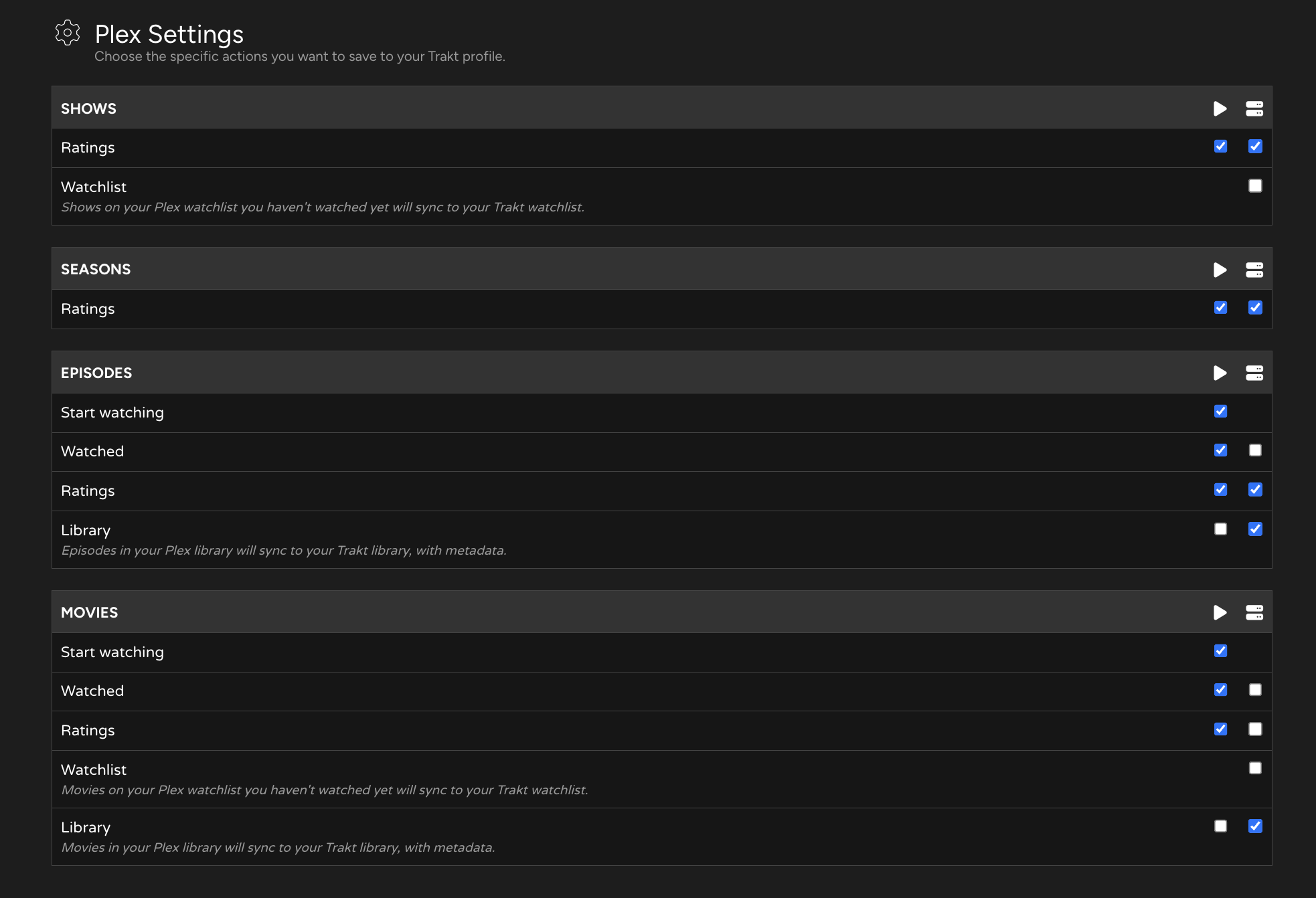
Justin has just addressed the issue of duplicates showing up, and he’ll work on it when he returns and has had time to think it over.
Remember, this is in BETA, and there are bound to be bugs, that’s why we’re here. 
1 Like
Well said. People getting all worked up and frustrated over a Beta feature that’s developing nicely is strange to me.
1 Like
Ah I didn’t realise there was that level of granularity for sync vs webhook. Thanks, I’ll update that.
2 Likes
Is anyone else seeing issues with new library items being correctly added by Plex Sync but not showing as collected when viewing the latest additions to the library. I can solve it by refreshing cache but haven’t had this issue before when I was running the webhook to pick up new additions. Now I’ve switched to only Plex Sync this seems to have popped up and is reproducible for me.
The following error message when I try the Plex-Sync:
 Plex Server is connected
 ’user’ option is blank
”No Plex libraries found!”

Can you try this, click the Disconnect, clear browser cache and resign in.
There should be a name under “User” and its not rendering for some reason.