Hi @justin
Did you manage to take a look yet? My last sync is still from the 11th of September with a lot of duplicate syncs and such. Any effort to manually queue a full or partial sync results in no change 
Hi @justin
Did you manage to take a look yet? My last sync is still from the 11th of September with a lot of duplicate syncs and such. Any effort to manually queue a full or partial sync results in no change
Hello, I have exactly the same problem. Have you found a solution?
Since October 20 there have been 14 syncs and what appears to be a decent amount of data. You can review the syncs at https://trakt.tv/settings/plex.
We’re not able to connect to your Plex sever. Please review your Plex Media Server settings and make sure it’s accessible remotely.
Problem solved, my server was accessible from outside (I’ve been doing this for years), but only from IP addresses originating in my country. 
That would do it
Hello,
Now that it’s connected to my server, I’ve completed the initial synchronization, but I’ve noticed that it only synced the watch history for movies and TV shows that are currently available in my Plex library.
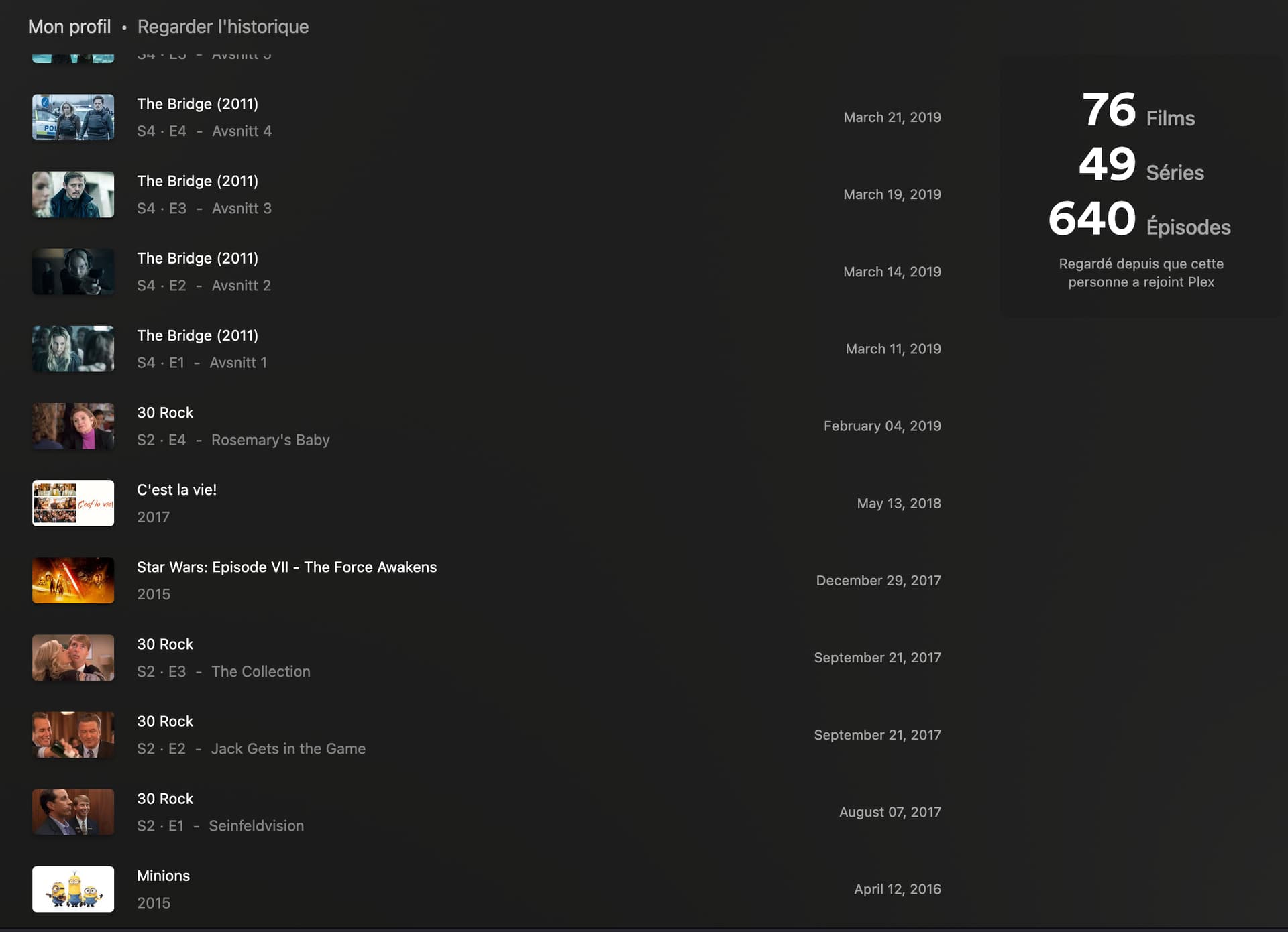
However, I regularly delete files from my server to save storage space, even though my complete watch history is still visible in my Plex profile. For example (see attached screenshot of myPlex Profile), TV shows like Taskmaster and The Paper that are still in my library appear in my Trakt watch history, but Evil Dead and Army of Darkness (which I’ve deleted from my server) do not appear in Trakt, even though they’re still in my Plex watch history.
Is this the expected behavior for Plex Sync? Does it only sync watch history for items that currently exist in the library, or is there a way to sync my complete Plex watch history including deleted content?
Thanks for your help!
Yes, it only looks directly at your Plex media server to get the watched items. Can you send me a link to the plex.tv website where it displays a list of your watched history? It’s something I can look into for a future enhancement, just depends what Plex APIs are available to get the info.
My profile is private but you can access it via a link like this :
https://watch.plex.tv/fr/u/[username]
or
https://app.plex.tv/desktop/#!/u/[username]
And specifically the watch history :
https://watch.plex.tv/fr/account/history
https://app.plex.tv/desktop/#!/account/history
https://app.plex.tv/desktop/#!/u/[username]/watch-history
You can chose who can access it :
You’re in control
Choose the type of activity you’d like to share with your friends.
Watch History
My Ratings and Reviews
My Watchlist
My FriendsWho can find your account?
Account Visibility → Anyone connected to PlexDropdown options:
- Anyone
- Anyone connected to Plex
- Friends of Friends
- Friends Only
- Private
If you reside in the United States, the watched video history setting above will apply for two years and then revert to private unless you renew your consent. All other choices will remain in effect until you modify them.
My history goes back to 2016.
It works now. I didn’t change anything.
@Justin Is it the intended outcome that if an item is removed from a Plex Watch List that it does so here too? Because I am not sure that’s actually working right now.
Related question, Trakt correctly removes series from a Watch List if completed. Plex doesn’t (they only remove movies) and this has been the cause for quite a few suggestions over the years which remain unsolved or implemented. How will this work when syncing? Will Trakt re-add the watchlisted item from Plex? Or will it know to ignore it because it’s watched. If the latter, how will it handle rewatching?
Thanks @justin it seems someone flicked the switch back on! 
The only thing still stuck is my watched history. After the previous weird syncs where it repeatedly synced the same, it now doesn’t sync the watched at all anymore.
Is this a current bug/known issue?
Syncs have stopped for the last few days, manual syncs also dont do anything anymore. Tried syncing play history for movies or episodes separately and combined it with collections but nothing seems te be working.
Disconnecting and reconnecting Plex has solved that for me each time it’s done that. Seems to be no explanation why it needs to be done though.
I just tried using the Sync Beta, but it ain’t working, no matter what I do. I can successfully connect my Plex account, but nothing is being synced, neither on initial setup nor on manual sync tasks. Tried disc/reconnect, same result…
webhooks is working, but it only syncs newly watched material. Don’t find a way to have everything currently marked as watched on Plex to be recorded on Trakt.
Any hints? Any known issues?
Well, seems to be working now. Guess the “Beta” status still applies 
I recently became a VIP member so I could sync my Plex. However the initial Plex sync won’t work. Everything is set up correctly and the Trakt settings detects my libraries. However when I save the tick boxes for my 2 libraries don’t save the “ticked” setting and neither does the initial sync settings, they don’t save either. Scrobbler works but I want to sync my whole library and watch history, not just what’s been added today.
I think this needs a kick start again. Disconnecting and reconnecting isn’t getting this going again. It’s picking up sporadic episodes here and there but no movies for the past 24 hours or so from one server. Back to just the Webhook for me until this gets fixed.
I’ve asked before and I’ll ask again, it would be so much simpler if WE could have access to seeing our logs for this too so WE could see where the issue is as well.
There was an issue with the hourly scheduler. We are working on an update to make it work more consistently. Syncs should be working again now though.
Inconsistent syncing is still an issue. No matter what I try I can’t get episodes/seasons to sync properly. I have disconnected/reconnected and resynced many times. No change.