Can't mark episodes as watched + missing progress on show page

It was working an hour ago but now there is no progress on show page. I already watched 2 seasons:

There is an error in console: jquery.min.js:4 GET https://trakt.tv/settings.json 500 (Internal Server Error)

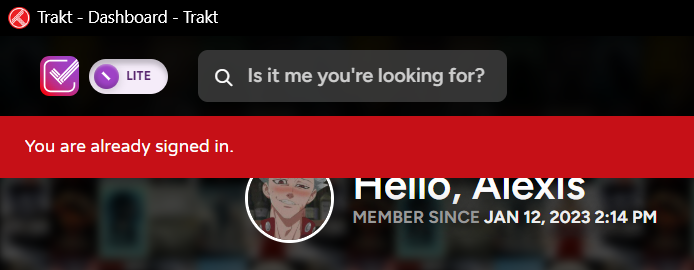
Also trying to mark episode as watched redirects to Discover. Track. Share. - Trakt with error that i’m already signed in

3 Likes

same problem here, trakt lite is working tho

1 Like

After I logged to lite and marked episode somehow on normal website it works for me too

Mine still isn’t working on normal, already signed in
Watch history is also missing in my dashboard

I have the same issue on the Trakt website. Trying to mark an episode as watched brings me to my dashboard while at the same time adding a message in red at the top of the website saying: “You’re already signed in.”

The strange thing is tv episodes and movies I’ve already watched and have added to my watch history on the Android app, also appear as unwatched on the website. They do appear in the recently watched section but the purple checkmark is missing and there’s no watch history to be shown.

I’ve already deleted my browsers data, this doesn’t have any effect.

Edit:
The issue seems to have been fixed for me.

I still have this problem whenever I tried to mark something as watched, that is not on my “Up Next” section

1 Like

Please try this - maybe it’s a similar issue

1 Like

I believe that fix it! Thanks a lot

Another thing, the section “Recently Watched” has disappear from my dashboard, is this normal?
It just to be right before “Social Feed”

Not sure, can you share a screenshot of what you’re seeing?

this section is showing in android trakt but not in the website

If you’re talking about app.trakt.tv, it’s under the Activity section as a filter.

1 Like

In my situation marking an episode as watched in Lite fixes problem for a day but the next day it happens again

https://trakt.tv/settings.json

{"status":500,"error":"Internal Server Error"}
1 Like

For me stopping the cookie blocker extension fixed the problem, steps:

  1. deactivate the cookie blocker (I don’t care about your cookies for example)

  2. accept or reject the cookies

  3. mark an episode as seen

    • it should work now.

Thanks! I removed that extension and disabled EasyList Cookie in Brave. When I opened the Trakt website, it asked me to accept cookies, and now everything works.

1 Like